# External meeting authorization service
Source: https://www.veeting.com/en/developer-documentation/external-meeting-authorization-service
## Overview
Meetings can be restricted in several ways. One option is to hand the decision to a service of your own, so that who may join is governed by the rules your systems already enforce, whether those rules live in a customer portal, a patient record, or a case file.
This page describes how to build that service.
## How the exchange works
The flow is a three-legged redirect, similar in shape to OAuth.
1. A participant opens a restricted meeting. The platform mints a **request token** and redirects the browser to your service, passing that token along.
2. Your service authenticates the person however you like and decides whether they may join.
3. If they may join, your service exchanges the request token for an **access token** in a server-to-server call.
4. Your service redirects the browser back to the meeting with the access token attached. That token grants the browser session access to the meeting.

```mermaid
sequenceDiagram
autonumber
participant B as Browser
participant V as Web meeting server
participant S as Your service
B->>V: Opens a restricted meeting
V-->>B: Redirect, with a request token
B->>S: Arrives with the request token
Note over S: Authenticates the person
and decides
S->>V: Exchanges the request token
(server to server)
V-->>S: Access token
S-->>B: Redirect back to the meeting,
with the access token
B->>V: Joins with the access token
```
The request token proves the platform sent the participant to you. The access token proves you sent them back.
## Step 1: Receive the redirect
Implement an endpoint that responds to `HTTP GET`. We redirect the browser to it with at least these query parameters:
| Parameter | Description |
| ------------ | ----------------------------------------------------------------------- |
| hostname | The hostname of the meeting platform, for example `meeting.example.org` |
| meetingId | The 24-character meeting ID, for example `5f521a93c20ff6721fbb6a6c` |
| meetingToken | The dashed meeting number, for example `0000-0000-0000-0000` |
| requestToken | A long random string that is valid for this meeting only |
We may append additional parameters, so read the ones you need by name rather than by position.
If your endpoint is `https://external.example.org/auth`, the browser arrives at:
```text
https://external.example.org/auth?hostname=webmeeting.example.com&meetingId=5f521a93c20ff6721fbb6a6c&meetingToken=8320-2640-2482-3499&requestToken=dedf1722-661f-4004-9aaf-d3e56c498859-a27fd10f-b697-4c83-bca0-cb764cfd6c43
```
## Step 2: Exchange the request token
After you decide that the participant may join, call us to exchange the request token for an access token:
```text
GET https:///api/v6/meeting-room/auth//access-token//
```
| Placeholder | Value |
| ------------- | ---------------------------------------------- |
| HOSTNAME | The `hostname` from the redirect |
| SECRET | The shared secret you configured (see below) |
| MEETING-ID | The 24-character `meetingId` from the redirect |
| REQUEST-TOKEN | The `requestToken` from the redirect |
We check that the request token was issued for that meeting. On success:
```json
{
"responseCode": 0,
"data": {
"meetingId": "5f521a93c20ff6721fbb6a6c",
"accessToken": "81430667-540e-4755-b32a-b5c51f704c7b-03526573-1494-48fb-a648-e80073275976"
}
}
```
This call follows the usual REST API conventions, so **check `responseCode` as well as the HTTP status** and read the token from `data.accessToken`. See [API usage](/en/developer-documentation/api-usage) for the response envelope.
> **This call carries your secret in the URL.** Make the call server to server, never from the browser, and never log the full URL.
## Step 3: Redirect back to the meeting
Send the browser to the meeting room with the access token attached:
```text
https:///meeting//join?meetingAccessToken=
```
| Placeholder | Value |
| ------------- | ------------------------------------------------------------------------- |
| HOSTNAME | The `hostname` from the redirect |
| MEETING-TOKEN | The **dashed** meeting number from the redirect, not the 24-character one |
| ACCESS-TOKEN | The `accessToken` you just received |
You can add [query parameters](/en/developer-documentation/query-parameters) to smooth the arrival, most usefully the values you already know from authenticating the person:
```text
https:///meeting//join?meetingAccessToken=&participantName=&participantEmail=
```
## Configuring the platform
In **Platform Settings**, open **System Configuration**, then **Meeting Room**, and set the default authentication type for meetings to **External Service**. Two fields appear.
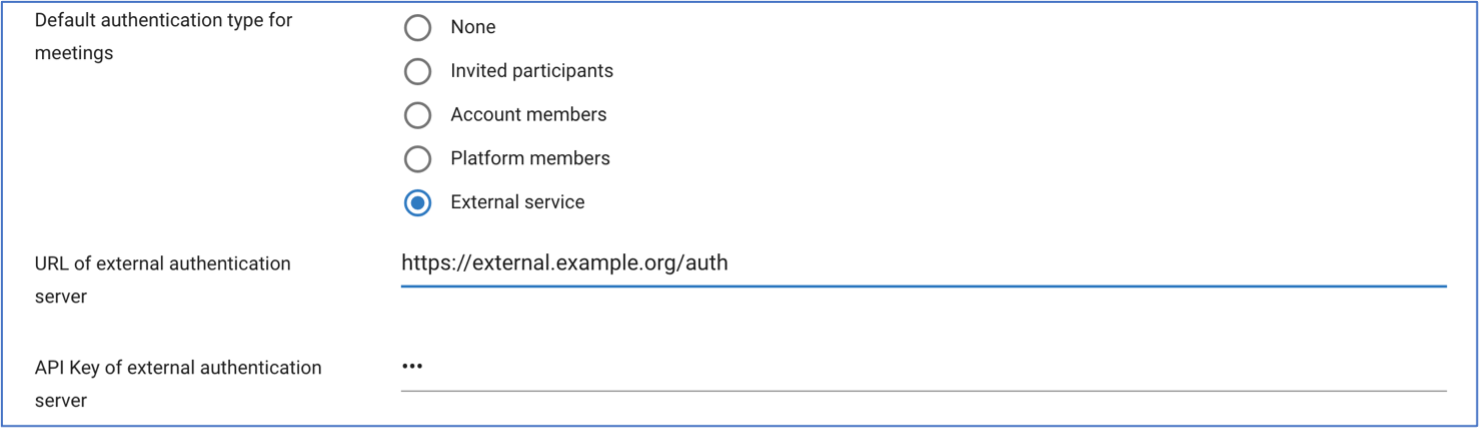
Enter the full URL of your endpoint in "URL of external authentication server" and your chosen secret in "API Key of external authentication server". The secret is stored encrypted, and every token exchange is verified against it.
The secret is yours to invent. Treat it like a password: long, random, and rotated if it ever leaks.
## A minimal implementation
```javascript
const express = require("express");
const app = express();
const port = 3000;
// Invent this yourself and configure the same value in the platform.
const SECRET = process.env.VEETING_SHARED_SECRET;
app.get("/auth", async (req, res) => {
const { hostname, meetingId, meetingToken, requestToken } = req.query;
// Decide here whether this person may join, using your own session,
// directory or customer database. Redirect them away if they may not.
if (!(await mayJoin(req, meetingId))) {
return res.status(403).send("Not authorized to join this meeting");
}
// Server to server: this URL contains the shared secret.
const url = `https://${hostname}/api/v6/meeting-room/auth/${SECRET}`
+ `/access-token/${meetingId}/${requestToken}`;
const response = await fetch(url).then((r) => r.json());
// HTTP 200 is not enough on its own, check responseCode too.
if (response.responseCode !== 0) {
return res.status(502).send("Could not obtain an access token");
}
const accessToken = response.data.accessToken;
res.redirect(`https://${hostname}/meeting/${meetingToken}/join`
+ `?meetingAccessToken=${encodeURIComponent(accessToken)}`);
});
app.listen(port);
```
## Common mistakes
- Redirecting to the wrong path: the meeting room is at `/meeting//join`.
- Using the 24-character `meetingId` in the redirect back, which needs the dashed `meetingToken`. The exchange call is the other way around.
- Checking only the HTTP status of the exchange call and not `responseCode`.
- Calling the exchange endpoint from the browser, which exposes your secret.
- Logging the exchange URL, which also exposes your secret.
- Letting the participant reach your endpoint without actually authenticating them: the request token proves where they came from, not who they are.
---
## The rest of this documentation
- [Custom tools](https://www.veeting.com/en/developer-documentation/custom-tools)
- [iFrame and Web Components](https://www.veeting.com/en/developer-documentation/iframe-and-web-components)
- [JavaScript APIs](https://www.veeting.com/en/developer-documentation/javascript-apis)
- [Query parameters](https://www.veeting.com/en/developer-documentation/query-parameters)
- [Veeting Blocks - Components](https://www.veeting.com/en/veeting-blocks/components)
- [Veeting Blocks - Introduction](https://www.veeting.com/en/veeting-blocks/introduction)
- [Veeting Blocks - JavaScript and Typescript APIs](https://www.veeting.com/en/veeting-blocks/apis)
- [Veeting Rooms REST APIs](https://www.veeting.com/en/developer-documentation/api-usage)
- [Video display calculator](https://www.veeting.com/en/developer-documentation/video-display-calculator)
- [Web hooks](https://www.veeting.com/en/developer-documentation/web-hooks)
All of it in one file: https://www.veeting.com/llms-full.txt