# Custom tools
Source: https://www.veeting.com/en/developer-documentation/custom-tools
## Overview
Custom tools put your own interface inside the meeting room, alongside video, documents, and the whiteboard. A tool is an icon, a label, and one of your pages displayed in an iFrame.
You configure them in the system settings of a white-label instance: **one configuration per instance**, and none by default.
## Choosing a source
There are two ways to supply a tool, and each instance uses one of them.
| Source | What it does | Use it when |
| ------------ | ------------------------------------------------------------------------------------ | ------------------------------------------------------- |
| iFrame URL | One fixed URL, shown to everyone | The tool is the same for every participant |
| API endpoint | We call your endpoint for each participant, and you return the tools they should see | Tools differ per participant, or you want more than one |
Whichever you choose, the tool must be enabled for the instance before anything appears.
## A fixed iFrame URL
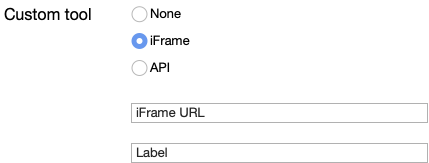
The URL must be served over HTTPS, and your web server must send headers that let a browser display it inside our page.
### The label
The label is either a fixed string or a pipe-separated list of translations.
| Label | Result |
| --------------------------------------------------------------------- | -------------------------------------------------------------------------------------------------------------------------------------------------------------------------------------- |
| My Custom Tool | Always reads "My Custom Tool", whatever language the meeting room is in. |
| en:My Custom Tool\|de-CH:Mein eigenes Tool\|fr:Mon outil personnalise | English shows "My Custom Tool", German shows "Mein eigenes Tool", and so on. A language not in the list falls back to the English entry if there is one, otherwise to the first entry. |
### What we append to your URL
We add query parameters so your page knows who is looking at it:
| Parameter | Value |
| --------------- | ------------------------------------------------------------------------------------------ |
| participantName | The participant's name |
| participantId | The unique ID of the meeting participant |
| meetingId | The 24-character meeting ID, for example `5349b4ddd2781d08c09890f3` |
| meetingToken | The dashed meeting number, for example `0000-0000-0000-0000` |
| culture | The participant's locale when they entered the room, for example `en`, `en-US`, or `de-DE` |
Two things to know:
- **`moderatorToken` is not sent here.** It is only sent to an API endpoint (see below). A fixed iFrame cannot tell whether the viewer is a moderator.
- If your URL already contains a `?`, the parameters are appended with `&`, so a URL with its own query string keeps working.
Values are URL-encoded, so decode them before use. A participant name containing a space or an ampersand arrives intact.
## An API endpoint
An API endpoint decides which tools each participant sees, and it can return up to five.
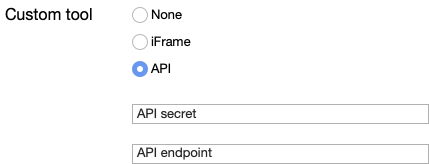
When someone joins, we call your endpoint and show them whatever it returns.

```mermaid
sequenceDiagram
autonumber
participant B as Web browser
participant V as Web meeting server
participant I as Your API endpoint
B->>V: Joins the meeting
V->>I: GET, with participant and meeting details
Note over I: Decides which tools this participant sees
I-->>V: Returns up to five tools
V-->>B: Returns the list of tools
Note over B: Shows the tools in the meeting room
```
### The request
We send an HTTP `GET` with your configured secret in an `X-API-KEY` header:
| Parameter | Value |
| --------------- | ---------------------------------------- |
| participantName | The participant's name |
| participantId | The unique ID of the meeting participant |
| meetingId | The 24-character meeting ID |
| meetingToken | The dashed meeting number |
| moderatorToken | The participant's moderator token |
> **Note:** `culture` is **not** sent to an API endpoint, and `moderatorToken` is **always** appended. For a participant who is not a moderator, it carries no valid token, so validate the value itself instead of relying on the parameter being present. Values are URL-encoded.
```bash
curl 'https://?participantName=Joe%20Doe\
&participantId=XXXXX\
&meetingId=5349b4ddd2781d08c09890f3\
&meetingToken=0000-0000-0000-0000\
&moderatorToken=YYYYY' \
-H 'X-API-KEY: ' \
-H 'accept: application/json, text/plain, */*'
```
### The response
Respond with HTTP 200 and a **bare JSON array** of tool objects. Do not wrap it in an envelope: unlike the REST API, nothing here unwraps a `data` property for you.
| Property | Meaning |
| --------- | --------------------------------------------------------------------------------------------------------------------------- |
| iFrameUrl | The URL to display. **A tool without one is skipped.** |
| toolIcon | An SVG string for the icon. Anything longer than 50,000 characters is dropped, and the tool falls back to the default icon. |
| labels | An array of label objects |
A label object:
| Property | Meaning |
| -------- | --------------------------------------------------------------- |
| culture | The locale of this label, for example `en`, `en-US`, or `de-DE` |
| label | The text to display, for example "My Custom Tool" |
```json
[
{
"iFrameUrl": "https://www.example.com/custom-tool-1",
"toolIcon": "",
"labels": [
{
"culture": "en-US",
"label": "Custom tool 1"
},
{
"culture": "de",
"label": "Spezialtool 1"
}
]
}
]
```
### Limits and fallbacks
- **At most five tools.** Anything beyond the fifth in your array is ignored.
- A tool with no `iFrameUrl` is skipped entirely.
- If `labels` is empty or missing, the tool is labeled "Custom tool".
- If the meeting room cannot match the participant's locale, it uses the first label in your array. Put your preferred default first.
- If your endpoint errors, times out, or returns something that is not an array, no custom tools are shown. The meeting continues normally.
## Common mistakes
- Swapping `meetingId` and `meetingToken`. `meetingId` is the 24-character one; `meetingToken` is the dashed one.
- Expecting `moderatorToken` on a fixed iFrame URL, where it is never sent.
- Expecting `culture` at an API endpoint, where it is never sent.
- Treating the presence of `moderatorToken` as proof the participant is a moderator.
- Wrapping the API response in an envelope instead of returning a bare array.
- Returning more than five tools and wondering where the rest went.
- Serving the tool over HTTP or with headers that forbid framing.
- Reading a participant name straight from the query string without decoding it.
---
## The rest of this documentation
- [External meeting authorization service](https://www.veeting.com/en/developer-documentation/external-meeting-authorization-service)
- [iFrame and Web Components](https://www.veeting.com/en/developer-documentation/iframe-and-web-components)
- [JavaScript APIs](https://www.veeting.com/en/developer-documentation/javascript-apis)
- [Query parameters](https://www.veeting.com/en/developer-documentation/query-parameters)
- [Veeting Blocks - Components](https://www.veeting.com/en/veeting-blocks/components)
- [Veeting Blocks - Introduction](https://www.veeting.com/en/veeting-blocks/introduction)
- [Veeting Blocks - JavaScript and Typescript APIs](https://www.veeting.com/en/veeting-blocks/apis)
- [Veeting Rooms REST APIs](https://www.veeting.com/en/developer-documentation/api-usage)
- [Video display calculator](https://www.veeting.com/en/developer-documentation/video-display-calculator)
- [Web hooks](https://www.veeting.com/en/developer-documentation/web-hooks)
All of it in one file: https://www.veeting.com/llms-full.txt